1/4 TB SQL Database backup in under 1 Minute!!! (3.05 GBPS transfer rate)

With the addition of another SATA SSD as well as another SLC Duo to serve as the target destination, the same SQL database which now has a total of 233 GB of used space was backed up in less than 1 minute using the same server referenced in my prior 2.0 GBPS backup post (http://blogs.msdn.com/b/microsoftbob/archive/2012/10/18/2gbps-backup-on-12-core-server-with-7-fusion-io-cards.aspx).

SQL Query Analyzer showed the throughput rate as 3119.9224 MBPS which rounds out to 3.05 GBPS, about 2.5 times the capacity of 10Gb Ethernet and fast enough to utilize 75% of 32gb InfiniBand often used in enterprise cloud infrastructures.

sql-snip1


sql-snip1

Note that the effective throughput was actually closer to 3 GBPS on the prior test rather than 2 GBPS and for the same rationale the effective rate of this test was close to 4.0 GBPS. This is based on the fact that there will be about 20 – 30% pages in a typical database – with or without compression – that is encompassed by a data structure (not marked as available) but not having to be backed up.

sql-snip0


I think (but am not yet sure) that the backup stats are only counting pages that are backed up and some pages in the database, although shown as is use, may not actually contain any data to backup. Whether you go with the higher or lower figure, the transfer rate is still remarkable.  Even using the lower 3.0 GBPS actual transfer rate, this works out to 180GB Per Minute and nearly11TB per hour.  Not bad considering that an Oracle Exabyte Database Machine (http://www.oracle.com/technetwork/database/features/availability/maa-tech-wp-sundbm-backup-11202-183503.pdf) only achieves 17 TB per hour on InfiniBand with hardware costing several million dollars, whereas my total investment here is under 50K. Even considering retail pricing on the cards, the total cost of the server is less than 180K. If we trust the backup to NULL would provide the maximum throughput of 5GBPS over 40GbPS InfiniBand , this would beat the Oracle configuration at 18TB Per Hour.  In terms of TPC-type terminology, we could say this server is providing each 1TB per hour backup speed at a cost of 10K.

This was produced by a modest 2 way 2.8 GHz X5660 configuration with 12 cores, 108GB, 8 HP IO Accelerator Cards (HP Branded Fusion-IO cards), 4 SATA SSDS (Intel and Samsung) with the O/S on 3 SAS mechanical drives using Raid-5. Details of the IO Accelerator configuration is in the prior post with the exception that the non-functioning SLC DUO is functioning in this test and the addition of 2 SATA SSDs. The additional devices were used to supplement the target backup destination which was the main limiting factor on the prior benchmark.

Backup to NUL device registered at nearly 4 GBPS, implying the bottleneck on the receiving end still even though the theoretical bandwidth of the destination should be over 4 GBPS. Based on testing using the NUL device as a backup target, It seems that this server is not able to provide more than around 8GBPS throughput combined read/write – even though the devices collectively added together are capable of over 10 GBPS – perhaps this is a BUS limitation somewhere between the PCIE bus and the processors.

The implications of this are far reaching:

Using an 8-way server with 128 or more cores would most likely allow the CPUs to compress fast enough for the data and double this to 36TB per hour, since such backup compression occurs before the data is sent over the wire. My database is actually achieving about 40% space reduction due to page and row compression and has multiple tables with over 1 billion rows, so in reality it is 1/2 TB of data. With a 128+ core system, if we factor in typical gains from backup and database compression, dedicated all the Accelerator cards to the database with an InfiniBand card using PCIE GEN 3 over a 56 Gb InfiniBand link, we could expect over 100TB per hour for a typical SQL Server backup – from a single 8-way 8U Server – costing less than 300K. This is using the first generation cards, the second generation cards double this.  Such an 8U server with PCIE GEN 3 cards could potentially saturate a 120 GB InfiniBand link with a 240TB per hour, backing up 1PB in a little over 4 hours.

To get an idea of how much 1PB is, see this link – http://gizmodo.com/5309889/how-large-is-a-petabyte – it is just 1/20th of the amount of data processed by Google on a single day and 2/3rds of all the photos on Facebook.

For more background on the configuration and methodology, see my earlier post at http://blogs.msdn.com/b/microsoftbob/archive/2012/10/18/2gbps-backup-on-12-core-server-with-7-fusion-io-cards.aspx.  You can see a demonstration of the backup and discussion. If you want to just see the actual backup execution, skip to the 7 minute mark. This is my first attempt at a youtube video, so please be merciful –


Posted in Uncategorized | Leave a comment

Quick update on IO Accelerator (testing)

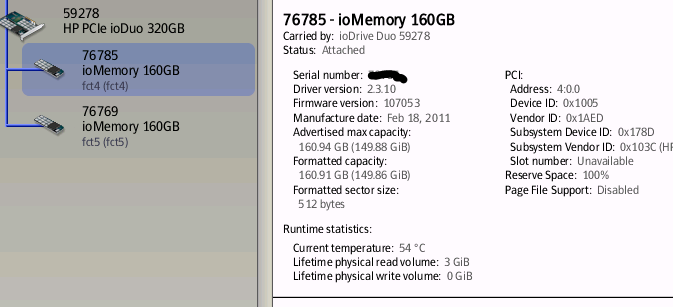
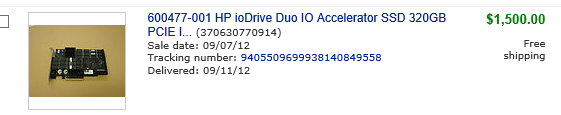
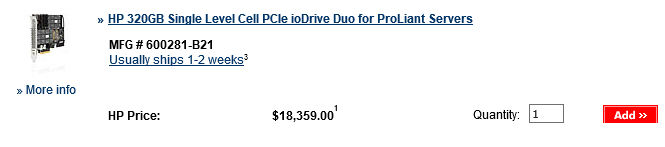
Follow-up from last post on 2.0 GBPS backup throughput – was able to update the firmware painlessly for the non-functional card from a Win 7 X64 machine so that it can now be updated on the HP Server to the latest HP-branded IO Accelerator driver. To my pleasant surprise, the last generic driver version (2.3.10) supported firmware updates all the way back from 2.1.0, the version associated with the firmware on the Card. As expected, the IO Accelerator card was virtually unused. It shows 0 GB Physical write. This 320GB HP IO Accelerator SLC Duo card was obtained for 1,500.00 from a liquidator on EBAY in September, the least I have ever paid for one of these. The price for a brand new HP SLC Duo on HP site? $18,359.00 so this was a savings of $16,859.00 – I essentially obtained a brand new card for around 8% of the retail price. Don’t get me wrong, I think this card is worth every bit of the HP $18,359.00 list price. However, the demand for second-hard cards of this caliber is very low so liquidators are pricing them ridiculously low compared to what they are really worth. I am the happy beneficiary.

A new test is planned now for weekend of October 26 adding the new card as well as another SATA SSD as destination media. Along with this there will be a couple of configuration changes such as making the backup media all RAID-0 instead of RAID-1 (this is after all a test aimed at maximizing throughput). I am hoping to get my hands on some HP aux power cables before then to supplement the PCIE bus power as that may become an issue. The other big change will be that the database is being scaled up to 1TB and it will still be meaningful data. The SQL database includes a stored procedure that generates correlative aggregate pairings utilizing a variety of technical indicators between any of the 12,000 or so equities and indexes. The sample size for this process is currently less than 500 and that generates nearly 1 billion rows consuming 40GB of space.  Increasing the combinations can be used to exponentially multiply the amount of data and quickly bring it to over 1TB. My goal is to achieve 3.5 GBps backup throughput – moving 1TB will stress the wear leveling since at even 3.5 GBps it will take over 5 minutes for a 1TB database.

image

image


image

Posted in Uncategorized | Leave a comment

Over 2 GBps SQL Server 2012 backup on 12-core server with 7 Fusion-IO Cards!

I managed to squeeze 2 GBps (2192.207 MBps to be exact) out on 12 cores using a HP Server DL370 with 12 x 2.66 (12 MB Cache) cores, 108GB RAM, and 7 Fusion-IO Cards backing up from a database stored on 5 cards to backup files spread across 2 other cards, 1 Intel SSD, and 2 Samsung SSDs,. The receiving end was saturated. I could probably get closer to 3GBps if I balanced the load better by getting more SATA SSDs (although my built-in HP SATA III controller won’t handle very many SSDs) along with moving some more output to the cards currently being used by the database. I am going to rerun the test as soon as I get around to updating the firmware on the one Fusion-IO cards that is extremely out of date (will have to put it into a separate staging server and go through 3 firmware upgrades to get it working, guessing this card was never even used). These cards were all purchased off of EBAY for about 20 – 30% of retail price. With the exception of one card, they are all at 100% reserve and most only have a fraction of their expected life used, especially the 4 SLC Cards. The breakdown is:

– 4 SLC 320GB Duos (8 drives)

– 1 MLC 640GB Duo (2 drives)

– 1 MLC 1.2 TB Duo (2 drives)

– 1 MLC 320GB IoDrive

– 1 SLC 320GB Duo awaiting firmware update.


The database is using 3 SLC Duos and 2 MLC Duos providing 8 drives mostly in RAID-0 with a RAID-1 for the log. The combined read capability is about 3.75 GBps. The SATA SSDs collectively seem to provide about 400MBps collectively (the 2 Samsungs are in a RAID 1) and the 3 drives from the MLC 320GB IODrive and 2 160GB drives from the 320GB SLC add another 2.0 GBPS write capability.

A couple of interesting things before getting to the images of the actual backup execution:

1) I had to turn off backup compression in SQL to get best results. The issue is that the 12 cores start to max out at about 1.2 GBPs throughput with compression. However, without compression, the throughput seems more limited by the actual storage device. I almost doubled throughput on the same backup not using compression. Caveat here is that this is only because the storage is providing the data faster than the CPUs can compress it, this is only an issue with very high throughput storage and limited CPU resources, so do not take this as a best practice. I would love to run this on a 96 core with compression – we might be looking at 4 GBps instead of 2 GBps with more powerful CPU resources for this storage using backup compression.

2) Tweaked the backup settings default values using more buffers, larger buffer size, etc. Also found that using more files was useful not only for ensuring granularity to balance the output across the devices correctly, but to maximize queue depth. I had to play with this some; Initial tests showed the backup stalling out because I was writing too much of the backup to the SATA SSDs. When I redistributed more to the IO cards, the backup utilized all of the devise all the way until the end rather than getting stuck on one. Something to keep in mind when doing striped backup, put enough files on the faster devices to even out the slower devices, it is striping based on data, not time and will happily keep writing to the slower device until getting all of the data on it even if the other files have all been buffered out to disk. Using mismatched media will also slow you down because I don’t think SQL will let the files get too far out of sync in the striping. My backup even with the less than optimal configuration still only took 2 minutes, so it was easy to see the lag at the end for the big files.

3) These cards are running without any auxiliary power connectors just using the PCIE bus power. At the bottom, I included the output of the FIO-STATUS –A so you can see details of the cards used. I am still trying to figure out who to talk to at Fusion-IO or HP to get some of these, this was of minimal effect because the HP server does a great job of keeping the cards cooled and most of the activity is read, but with putting more cards on the receiving end, I suspect that the aux power will help.

It is something to fathom – backing up a database of over 150GB in less than 1 1/2 minutes. This database contains billions of stock market transactions, not just a generated bunch of dummy data.

Without further ado, here are a couple of screen snapshots, I really should put this on Youtube as it is incredible to watch this actually happen and watch the Resource monitor spike to over 5GBps read throughput at times. I think this is quite an accomplishment and shows the value of these cards. I’ve not found anybody else achieve this level of throughput at this low of a hardware cost with such a small server. This type of performance usually takes at least 48 cores and a 4-way processor in addition to the high-speed storage. This is just a 2-way Nephalem Xeon configuration. I am hoping to get this up to 3.5 GBps with the balancing of the cards better for write and read.  Of course if I had a couple of Duo-2s, who knows. The CPUs were only hitting about 20% with the compression turned off. With 4 newer Duos (the new cards require X8, the server has only 4 X8), this could potentially go to 6Gbps.


clip_image002

clip_image004

Found 15 ioMemory devices in this system with 7 ioDrive Duos

Fusion-io driver version: 3.1.1 build 181

Adapter: Single Adapter

HP 320GB MLC PCIe ioDrive for ProLiant Servers, Product Number:600279-B21, SN:XXXXX

Pseudo Low-Profile ioDIMM Adapter, PN:00119200000

External Power: NOT connected

PCIe Bus voltage: avg 11.71V min 11.65V max 11.73V

PCIe Bus current: avg 0.46A max 1.69A

PCIe Bus power: avg 5.40W max 19.73W

PCIe Power limit threshold: 24.75W

PCIe slot available power: unavailable

Connected ioMemory modules:

fct2: Product Number:600279-B21

fct2 Attached as ‘fct2’ (block device)

HP ioDrive 320GB, Product Number:600279-B21

HP ioDrive 320GB, PN:00214200302

Located in slot 0 Center of Pseudo Low-Profile ioDIMM Adapter SN: XXXXX

Powerloss protection: protected

Last Power Monitor Incident: 33533 sec

PCI:02:00.0, Slot Number:1

Vendor:1aed, Device:1005, Sub vendor:103c, Sub device:178c

Firmware v6.0.0, rev 107006 Public

288.00 GBytes block device size

Format: v500, 562500000 sectors of 512 bytes

PCIe slot available power: unavailable

Internal temperature: 43.31 degC, max 44.30 degC

Internal voltage: avg 1.00V, max 1.02V

Aux voltage: avg 2.46V, max 2.46V

Reserve space status: Healthy; Reserves: 100.00%, warn at 10.00%

Lifetime data volumes:

Physical bytes written: 9,532,104,713,616

Physical bytes read : 9,598,909,699,136

RAM usage:

Current: 126,144,192 bytes

Peak : 126,951,232 bytes

Adapter: Dual Adapter

HP 320GB SLC PCIe ioDrive Duo for ProLiant Servers, Product Number:600281-B21, SN:59738

ioDrive Duo HL, PN:00190000107

External Power: NOT connected

PCIe Bus voltage: avg 11.99V min 11.92V max 12.00V

PCIe Bus current: avg 0.91A max 2.41A

PCIe Bus power: avg 10.92W max 19.87W

PCIe Power limit threshold: 24.75W

PCIe slot available power: unavailable

Connected ioMemory modules:

fct16: Product Number:600281-B21

fct17: Product Number:600281-B21

fct16 Attached as ‘fct16’ (block device)

HP ioDIMM 160GB, Product Number:600281-B21

HP ioDIMM 160GB, PN:00277100101

Located in slot 0 Upper of ioDrive Duo HL SN: XXXXX

Powerloss protection: protected

Last Power Monitor Incident: 33506 sec

PCI:10:00.0, Slot Number:3

Vendor:1aed, Device:1005, Sub vendor:103c, Sub device:178d

Firmware v6.0.0, rev 107007 Public

128.00 GBytes block device size

Format: v500, 31250000 sectors of 4096 bytes

PCIe slot available power: unavailable

Internal temperature: 45.77 degC, max 46.26 degC

Internal voltage: avg 1.03V, max 1.03V

Aux voltage: avg 2.44V, max 2.44V

Reserve space status: Healthy; Reserves: 100.00%, warn at 10.00%

Lifetime data volumes:

Physical bytes written: 799,340,235,816

Physical bytes read : 1,393,505,907,368

RAM usage:

Current: 49,125,952 bytes

Peak : 49,125,952 bytes

fct17 Attached as ‘fct17’ (block device)

HP ioDIMM 160GB, Product Number:600281-B21

HP ioDIMM 160GB, PN:00277100101

Located in slot 1 Lower of ioDrive Duo HL SN: XXXXX

Powerloss protection: protected

Last Power Monitor Incident: 33507 sec

PCI:11:00.0, Slot Number:3

Vendor:1aed, Device:1005, Sub vendor:103c, Sub device:178d

Firmware v6.0.0, rev 107007 Public

128.00 GBytes block device size

Format: v500, 31250000 sectors of 4096 bytes

PCIe slot available power: unavailable

Internal temperature: 39.87 degC, max 40.85 degC

Internal voltage: avg 1.01V, max 1.01V

Aux voltage: avg 2.43V, max 2.43V

Reserve space status: Healthy; Reserves: 93.90%, warn at 10.00%

Lifetime data volumes:

Physical bytes written: 497,387,016,664

Physical bytes read : 1,115,459,630,528

RAM usage:

Current: 49,051,072 bytes

Peak : 49,051,072 bytes

Adapter: Dual Adapter

HP 320GB SLC PCIe ioDrive Duo for ProLiant Servers, Product Number:600281-B21, SN: XXXXX

ioDrive Duo HL, PN:00190000107

External Power: NOT connected

PCIe Bus voltage: avg 11.99V min 11.92V max 12.01V

PCIe Bus current: avg 0.95A max 2.26A

PCIe Bus power: avg 11.45W max 27.08W

PCIe Power limit threshold: 24.75W

PCIe slot available power: unavailable

Connected ioMemory modules:

fct21: Product Number:600281-B21

fct22: Product Number:600281-B21

fct21 Attached as ‘fct21’ (block device)

HP ioDIMM 160GB, Product Number:600281-B21

HP ioDIMM 160GB, PN:00277100103

Located in slot 0 Upper of ioDrive Duo HL SN: XXXXX

Powerloss protection: protected

Last Power Monitor Incident: 33775 sec

PCI:15:00.0, Slot Number:4

Vendor:1aed, Device:1005, Sub vendor:103c, Sub device:178d

Firmware v6.0.0, rev 107007 Public

128.00 GBytes block device size

Format: v500, 31250000 sectors of 4096 bytes

PCIe slot available power: unavailable

Internal temperature: 45.28 degC, max 45.77 degC

Internal voltage: avg 1.03V, max 1.03V

Aux voltage: avg 2.46V, max 2.46V

Reserve space status: Healthy; Reserves: 93.89%, warn at 10.00%

Lifetime data volumes:

Physical bytes written: 2,399,961,878,072

Physical bytes read : 3,486,203,149,520

RAM usage:

Current: 52,154,432 bytes

Peak : 52,154,432 bytes

fct22 Attached as ‘fct22’ (block device)

HP ioDIMM 160GB, Product Number:600281-B21

HP ioDIMM 160GB, PN:00277100103

Located in slot 1 Lower of ioDrive Duo HL SN: XXXXX

Powerloss protection: protected

PCI:16:00.0, Slot Number:4

Vendor:1aed, Device:1005, Sub vendor:103c, Sub device:178d

Firmware v6.0.0, rev 107007 Public

128.00 GBytes block device size

Format: v500, 31250000 sectors of 4096 bytes

PCIe slot available power: unavailable

Internal temperature: 44.30 degC, max 45.77 degC

Internal voltage: avg 1.00V, max 1.01V

Aux voltage: avg 2.46V, max 2.46V

Reserve space status: Healthy; Reserves: 93.90%, warn at 10.00%

Lifetime data volumes:

Physical bytes written: 2,509,265,675,328

Physical bytes read : 3,186,755,344,040

RAM usage:

Current: 525,667,328 bytes

Peak : 525,667,328 bytes

Adapter: Dual Adapter

HP 320GB SLC PCIe ioDrive Duo for ProLiant Servers, Product Number:600281-B21, SN: XXXXX

ioDrive Duo HL, PN:00190000107

External Power: NOT connected

PCIe Bus voltage: min 7.88V max 12.21V

PCIe Bus current: max 0.95A

PCIe slot available power: unavailable

Connected ioMemory modules:

fct31: Product Number:600281-B21

fct32: Product Number:600281-B21

fct31 Status unknown: Driver is in MINIMAL MODE:

The firmware on this device is not compatible with the currently installed version of the driver

HP ioDIMM 160GB, Product Number:600281-B21

!! —> There are active errors or warnings on this device! Read below for details.

HP ioDIMM 160GB, PN:00277100101

Located in slot 0 Upper of ioDrive Duo HL SN: XXXXX

Powerloss protection: not available

PCI:1f:00.0, Slot Number:5

Vendor:1aed, Device:1005, Sub vendor:103c, Sub device:178d

Firmware v3.0.3, rev 43246 Public

Geometry and capacity information not available.

Format: not low-level formatted

PCIe slot available power: unavailable

Internal temperature: 43.80 degC, max 44.30 degC

Internal voltage: avg 1.03V, max 1.03V

Aux voltage: avg 2.46V, max 2.46V

Lifetime data volumes:

Physical bytes written: 0

Physical bytes read : 0

RAM usage:

Current: 0 bytes

Peak : 0 bytes

ACTIVE WARNINGS:

The ioMemory is currently running in a minimal state.

fct32 Status unknown: Driver is in MINIMAL MODE:

The firmware on this device is not compatible with the currently installed version of the driver

HP ioDIMM 160GB, Product Number:600281-B21

!! —> There are active errors or warnings on this device! Read below for details.

HP ioDIMM 160GB, PN:00277100101

Located in slot 0 Upper of ioDrive Duo HL SN: XXXXX

Powerloss protection: not available

PCI:20:00.0, Slot Number:5

Vendor:1aed, Device:1005, Sub vendor:103c, Sub device:178d

Firmware v3.0.3, rev 43246 Public

Geometry and capacity information not available.

Format: not low-level formatted

PCIe slot available power: unavailable

Internal temperature: 42.82 degC, max 43.31 degC

Internal voltage: avg 1.01V, max 1.01V

Aux voltage: avg 2.45V, max 2.45V

Lifetime data volumes:

Physical bytes written: 0

Physical bytes read : 0

RAM usage:

Current: 0 bytes

Peak : 0 bytes

ACTIVE WARNINGS:

The ioMemory is currently running in a minimal state.

Adapter: Dual Adapter

HP 640GB MLC PCIe ioDrive Duo for ProLiant Servers, Product Number:600282-B21, SN: XXXXX

ioDrive Duo HL, PN:00190000108

External Power: NOT connected

PCIe Bus voltage: avg 11.99V min 11.93V max 12.02V

PCIe Bus current: avg 0.96A max 2.21A

PCIe Bus power: avg 11.48W max 26.39W

PCIe Power limit threshold: 24.75W

PCIe slot available power: unavailable

Connected ioMemory modules:

fct36: Product Number:600282-B21

fct37: Product Number:600282-B21

fct36 Attached as ‘fct36’ (block device)

HP ioDIMM 320GB, Product Number:600282-B21

HP ioDIMM 320GB, PN:00277100201

Located in slot 0 Upper of ioDrive Duo HL SN: XXXXX

Powerloss protection: protected

Last Power Monitor Incident: 33595 sec

PCI:24:00.0, Slot Number:6

Vendor:1aed, Device:1005, Sub vendor:103c, Sub device:178e

Firmware v6.0.0, rev 107007 Public

256.00 GBytes block device size

Format: v500, 62500000 sectors of 4096 bytes

PCIe slot available power: unavailable

Internal temperature: 45.28 degC, max 45.77 degC

Internal voltage: avg 1.03V, max 1.03V

Aux voltage: avg 2.47V, max 2.48V

Reserve space status: Healthy; Reserves: 100.00%, warn at 10.00%

Lifetime data volumes:

Physical bytes written: 3,071,101,924,128

Physical bytes read : 3,407,184,536,048

RAM usage:

Current: 32,577,472 bytes

Peak : 32,577,472 bytes

fct37 Attached as ‘fct37’ (block device)

HP ioDIMM 320GB, Product Number:600282-B21

HP ioDIMM 320GB, PN:00277100201

Located in slot 1 Lower of ioDrive Duo HL SN: XXXXX

Powerloss protection: protected

PCI:25:00.0, Slot Number:6

Vendor:1aed, Device:1005, Sub vendor:103c, Sub device:178e

Firmware v6.0.0, rev 107007 Public

256.00 GBytes block device size

Format: v500, 62500000 sectors of 4096 bytes

PCIe slot available power: unavailable

Internal temperature: 39.87 degC, max 40.36 degC

Internal voltage: avg 1.01V, max 1.02V

Aux voltage: avg 2.46V, max 2.47V

Reserve space status: Healthy; Reserves: 100.00%, warn at 10.00%

Lifetime data volumes:

Physical bytes written: 2,380,119,569,280

Physical bytes read : 2,736,125,677,440

RAM usage:

Current: 32,544,192 bytes

Peak : 32,544,192 bytes

Adapter: Dual Adapter

HP 320GB SLC PCIe ioDrive Duo for ProLiant Servers, Product Number:600281-B21, SN: XXXXX

ioDrive Duo HL, PN:00190000107

External Power: NOT connected

PCIe Bus voltage: avg 11.99V min 11.93V max 12.02V

PCIe Bus current: avg 0.90A max 1.33A

PCIe Bus power: avg 10.74W max 15.92W

PCIe Power limit threshold: 24.75W

PCIe slot available power: unavailable

Connected ioMemory modules:

fct41: Product Number:600281-B21

fct42: Product Number:600281-B21

fct41 Detached

HP ioDIMM 160GB, Product Number:600281-B21

HP ioDIMM 160GB, PN:00277100101

Located in slot 0 Upper of ioDrive Duo HL SN: XXXXX

Powerloss protection: protected

PCI:29:00.0, Slot Number:7

Vendor:1aed, Device:1005, Sub vendor:103c, Sub device:178d

Firmware v6.0.0, rev 107007 Public

144.00 GBytes block device size

Format: v500, 35156250 sectors of 4096 bytes

PCIe slot available power: unavailable

Internal temperature: 40.85 degC, max 41.34 degC

Internal voltage: avg 1.03V, max 1.03V

Aux voltage: avg 2.46V, max 2.46V

Reserve space status: Healthy; Reserves: 100.00%, warn at 10.00%

Lifetime data volumes:

Physical bytes written: 959,690,184

Physical bytes read : 6,919,113,776

RAM usage:

Current: 10,920,000 bytes

Peak : 10,920,000 bytes

fct42 Detached

HP ioDIMM 160GB, Product Number:600281-B21

HP ioDIMM 160GB, PN:00277100101

Located in slot 1 Lower of ioDrive Duo HL SN: XXXXX

Powerloss protection: protected

PCI:2a:00.0, Slot Number:7

Vendor:1aed, Device:1005, Sub vendor:103c, Sub device:178d

Firmware v6.0.0, rev 107007 Public

144.00 GBytes block device size

Format: v500, 35156250 sectors of 4096 bytes

PCIe slot available power: unavailable

Internal temperature: 42.33 degC, max 42.82 degC

Internal voltage: avg 1.00V, max 1.00V

Aux voltage: avg 2.45V, max 2.45V

Reserve space status: Healthy; Reserves: 100.00%, warn at 10.00%

Lifetime data volumes:

Physical bytes written: 960,269,736

Physical bytes read : 6,932,504,752

RAM usage:

Current: 10,920,000 bytes

Peak : 10,920,000 bytes

Adapter: Dual Adapter

HP 320GB SLC PCIe ioDrive Duo for ProLiant Servers, Product Number:600281-B21, SN: XXXXX

ioDrive Duo HL, PN:00190000107

External Power: NOT connected

PCIe Bus voltage: avg 11.99V min 11.92V max 12.02V

PCIe Bus current: avg 0.97A max 2.31A

PCIe Bus power: avg 11.58W max 27.61W

PCIe Power limit threshold: 24.75W

PCIe slot available power: unavailable

Connected ioMemory modules:

fct46: Product Number:600281-B21

fct47: Product Number:600281-B21

fct46 Attached as ‘fct46’ (block device)

HP ioDIMM 160GB, Product Number:600281-B21

HP ioDIMM 160GB, PN:00277100101

Located in slot 0 Upper of ioDrive Duo HL SN: XXXXX

Powerloss protection: protected

Last Power Monitor Incident: 33713 sec

PCI:2e:00.0, Slot Number:8

Vendor:1aed, Device:1005, Sub vendor:103c, Sub device:178d

Firmware v6.0.0, rev 107007 Public

128.00 GBytes block device size

Format: v500, 31250000 sectors of 4096 bytes

PCIe slot available power: unavailable

Internal temperature: 44.30 degC, max 44.79 degC

Internal voltage: avg 1.02V, max 1.03V

Aux voltage: avg 2.47V, max 2.47V

Reserve space status: Healthy; Reserves: 100.00%, warn at 10.00%

Lifetime data volumes:

Physical bytes written: 661,125,209,496

Physical bytes read : 1,182,061,604,688

RAM usage:

Current: 525,667,840 bytes

Peak : 525,667,840 bytes

fct47 Attached as ‘fct47’ (block device)

HP ioDIMM 160GB, Product Number:600281-B21

HP ioDIMM 160GB, PN:00277100101

Located in slot 1 Lower of ioDrive Duo HL SN:104395

Powerloss protection: protected

PCI:2f:00.0, Slot Number:8

Vendor:1aed, Device:1005, Sub vendor:103c, Sub device:178d

Firmware v6.0.0, rev 107007 Public

128.00 GBytes block device size

Format: v500, 31250000 sectors of 4096 bytes

PCIe slot available power: unavailable

Internal temperature: 41.83 degC, max 42.33 degC

Internal voltage: avg 1.00V, max 1.01V

Aux voltage: avg 2.46V, max 2.47V

Reserve space status: Healthy; Reserves: 100.00%, warn at 10.00%

Lifetime data volumes:

Physical bytes written: 612,235,065,752

Physical bytes read : 1,107,146,274,888

RAM usage:

Current: 525,666,880 bytes

Peak : 525,666,880 bytes

Adapter: Dual Adapter

HP 1280GB MLC PCIe ioDrive Duo for ProLiant Servers, Product Number:641027-B21, SN: XXXXX

ioDrive Duo HL, PN:00190000108

External Power: NOT connected

PCIe Bus voltage: avg 12.00V min 11.93V max 12.02V

PCIe Bus current: avg 0.93A max 1.87A

PCIe Bus power: avg 11.17W max 22.36W

PCIe Power limit threshold: 24.75W

PCIe slot available power: unavailable

Connected ioMemory modules:

fct51: Product Number:641027-B21

fct52: Product Number:641027-B21

fct51 Attached as ‘fct51’ (block device)

ioDIMM 640, SN: XXXXX

ioDIMM 640, PN:00277100605

Located in slot 0 Upper of ioDrive Duo HL SN: XXXXX

Powerloss protection: protected

Last Power Monitor Incident: 33703 sec

PCI:33:00.0, Slot Number:9

Vendor:1aed, Device:1005, Sub vendor:103c, Sub device:176f

Firmware v6.0.0, rev 107007 Public

512.00 GBytes block device size

Format: v500, 125000000 sectors of 4096 bytes

PCIe slot available power: unavailable

Internal temperature: 41.34 degC, max 42.33 degC

Internal voltage: avg 1.02V, max 1.03V

Aux voltage: avg 2.47V, max 2.47V

Reserve space status: Healthy; Reserves: 100.00%, warn at 10.00%

Rated PBW: 10.00 PB, 98.96% remaining

Lifetime data volumes:

Physical bytes written: 103,651,963,293,456

Physical bytes read : 127,186,509,181,944

RAM usage:

Current: 53,448,192 bytes

Peak : 53,448,192 bytes

fct52 Attached as ‘fct52’ (block device)

ioDIMM 640, SN: XXXXX

ioDIMM 640, PN:00277100605

Located in slot 1 Lower of ioDrive Duo HL SN: XXXXX

Powerloss protection: protected

PCI:34:00.0, Slot Number:9

Vendor:1aed, Device:1005, Sub vendor:103c, Sub device:176f

Firmware v6.0.0, rev 107007 Public

512.00 GBytes block device size

Format: v500, 125000000 sectors of 4096 bytes

PCIe slot available power: unavailable

Internal temperature: 38.39 degC, max 38.88 degC

Internal voltage: avg 1.00V, max 1.01V

Aux voltage: avg 2.46V, max 2.46V

Reserve space status: Healthy; Reserves: 100.00%, warn at 10.00%

Rated PBW: 10.00 PB, 98.98% remaining

Lifetime data volumes:

Physical bytes written: 102,299,237,920,520

Physical bytes read : 126,266,803,141,400

RAM usage:

Current: 53,489,792 bytes

Peak : 53,489,792 bytes

Posted in Uncategorized | Leave a comment

2 GBps Backup Throughput with 8 Fusion-IO Cards on HP DL370 G6 12-core server

I had to turn off backup compression to do it because the 12 cores get maxed out with compression when getting above 1 GBps, but I managed to get 2GBps on my HP 12U server with 108GB of RAM with cold starting SQL Server (no cache benefit) for a 120GB database. I tweaked some settings on the backup. With more cores and backup compression, I think this could go up to over 10GBps provided suitable retaining medium. I actually had to divvy 2 of the IO Cards to support receiving the backup. This server has 6 functioning DUOS (4 of which are SLC-type) and 2 MLC card. The combined read throughput (once the non-functional card becomes operational – needs firmware update) is potentially over 10GBps and the write throughput is around 8GBps. These are OLDER generation cards gotten off of EBAY!! This is without any auxiliary power connectors for the cards.

Below are the screen snapshots. I was going to create a YouTube video but haven’t had a chance. Below that are the cards in the server:

Found 15 ioMemory devices in this system with 7 ioDrive Duos
Fusion-io driver version: 3.1.1 build 181

Adapter: Single Adapter
HP 320GB MLC PCIe ioDrive for ProLiant Servers, Product Number:600279-B21, SN:XXXXX
Pseudo Low-Profile ioDIMM Adapter, PN:00119200000
External Power: NOT connected
PCIe Bus voltage: avg 11.71V min 11.65V max 11.73V
PCIe Bus current: avg 0.46A max 1.69A
PCIe Bus power: avg 5.40W max 19.73W
PCIe Power limit threshold: 24.75W
PCIe slot available power: unavailable
Connected ioMemory modules:
   fct2: Product Number:600279-B21

fct2 Attached as ‘fct2’ (block device)
HP ioDrive 320GB, Product Number:600279-B21
HP ioDrive 320GB, PN:00214200302
Located in slot 0 Center of Pseudo Low-Profile ioDIMM Adapter SN:XXXXX
Powerloss protection: protected
Last Power Monitor Incident: 33533 sec
PCI:02:00.0, Slot Number:1
Vendor:1aed, Device:1005, Sub vendor:103c, Sub device:178c
Firmware v6.0.0, rev 107006 Public
288.00 GBytes block device size
Format: v500, 562500000 sectors of 512 bytes
PCIe slot available power: unavailable
Internal temperature: 43.31 degC, max 44.30 degC
Internal voltage: avg 1.00V, max 1.02V
Aux voltage: avg 2.46V, max 2.46V
Reserve space status: Healthy; Reserves: 100.00%, warn at 10.00%
Lifetime data volumes:
    Physical bytes written: 9,532,104,713,616
    Physical bytes read   : 9,598,909,699,136
RAM usage:
    Current: 126,144,192 bytes
    Peak   : 126,951,232 bytes

Adapter: Dual Adapter
HP 320GB SLC PCIe ioDrive Duo for ProLiant Servers, Product Number:600281-B21, SN:XXXXX
ioDrive Duo HL, PN:00190000107
External Power: NOT connected
PCIe Bus voltage: avg 11.99V min 11.92V max 12.00V
PCIe Bus current: avg 0.91A max 2.41A
PCIe Bus power: avg 10.92W max 19.87W
PCIe Power limit threshold: 24.75W
PCIe slot available power: unavailable
Connected ioMemory modules:
   fct16: Product Number:600281-B21
   fct17: Product Number:600281-B21

fct16 Attached as ‘fct16’ (block device)
HP ioDIMM 160GB, Product Number:600281-B21
HP ioDIMM 160GB, PN:00277100101
Located in slot 0 Upper of ioDrive Duo HL SN:XXXXX
Powerloss protection: protected
Last Power Monitor Incident: 33506 sec
PCI:10:00.0, Slot Number:3
Vendor:1aed, Device:1005, Sub vendor:103c, Sub device:178d
Firmware v6.0.0, rev 107007 Public
128.00 GBytes block device size
Format: v500, 31250000 sectors of 4096 bytes
PCIe slot available power: unavailable
Internal temperature: 45.77 degC, max 46.26 degC
Internal voltage: avg 1.03V, max 1.03V
Aux voltage: avg 2.44V, max 2.44V
Reserve space status: Healthy; Reserves: 100.00%, warn at 10.00%
Lifetime data volumes:
    Physical bytes written: 799,340,235,816
    Physical bytes read   : 1,393,505,907,368
RAM usage:
    Current: 49,125,952 bytes
    Peak   : 49,125,952 bytes

fct17 Attached as ‘fct17’ (block device)
HP ioDIMM 160GB, Product Number:600281-B21
HP ioDIMM 160GB, PN:00277100101
Located in slot 1 Lower of ioDrive Duo HL SN:XXXXX
Powerloss protection: protected
Last Power Monitor Incident: 33507 sec
PCI:11:00.0, Slot Number:3
Vendor:1aed, Device:1005, Sub vendor:103c, Sub device:178d
Firmware v6.0.0, rev 107007 Public
128.00 GBytes block device size
Format: v500, 31250000 sectors of 4096 bytes
PCIe slot available power: unavailable
Internal temperature: 39.87 degC, max 40.85 degC
Internal voltage: avg 1.01V, max 1.01V
Aux voltage: avg 2.43V, max 2.43V
Reserve space status: Healthy; Reserves: 93.90%, warn at 10.00%
Lifetime data volumes:
    Physical bytes written: 497,387,016,664
    Physical bytes read   : 1,115,459,630,528
RAM usage:
    Current: 49,051,072 bytes
    Peak   : 49,051,072 bytes

Adapter: Dual Adapter
HP 320GB SLC PCIe ioDrive Duo for ProLiant Servers, Product Number:600281-B21, SN:XXXXX
ioDrive Duo HL, PN:00190000107
External Power: NOT connected
PCIe Bus voltage: avg 11.99V min 11.92V max 12.01V
PCIe Bus current: avg 0.95A max 2.26A
PCIe Bus power: avg 11.45W max 27.08W
PCIe Power limit threshold: 24.75W
PCIe slot available power: unavailable
Connected ioMemory modules:
   fct21: Product Number:600281-B21
   fct22: Product Number:600281-B21

fct21 Attached as ‘fct21’ (block device)
HP ioDIMM 160GB, Product Number:600281-B21
HP ioDIMM 160GB, PN:00277100103
Located in slot 0 Upper of ioDrive Duo HL SN:XXXXX
Powerloss protection: protected
Last Power Monitor Incident: 33775 sec
PCI:15:00.0, Slot Number:4
Vendor:1aed, Device:1005, Sub vendor:103c, Sub device:178d
Firmware v6.0.0, rev 107007 Public
128.00 GBytes block device size
Format: v500, 31250000 sectors of 4096 bytes
PCIe slot available power: unavailable
Internal temperature: 45.28 degC, max 45.77 degC
Internal voltage: avg 1.03V, max 1.03V
Aux voltage: avg 2.46V, max 2.46V
Reserve space status: Healthy; Reserves: 93.89%, warn at 10.00%
Lifetime data volumes:
    Physical bytes written: 2,399,961,878,072
    Physical bytes read   : 3,486,203,149,520
RAM usage:
    Current: 52,154,432 bytes
    Peak   : 52,154,432 bytes

fct22 Attached as ‘fct22’ (block device)
HP ioDIMM 160GB, Product Number:600281-B21
HP ioDIMM 160GB, PN:00277100103
Located in slot 1 Lower of ioDrive Duo HL SN:XXXXX
Powerloss protection: protected
PCI:16:00.0, Slot Number:4
Vendor:1aed, Device:1005, Sub vendor:103c, Sub device:178d
Firmware v6.0.0, rev 107007 Public
128.00 GBytes block device size
Format: v500, 31250000 sectors of 4096 bytes
PCIe slot available power: unavailable
Internal temperature: 44.30 degC, max 45.77 degC
Internal voltage: avg 1.00V, max 1.01V
Aux voltage: avg 2.46V, max 2.46V
Reserve space status: Healthy; Reserves: 93.90%, warn at 10.00%
Lifetime data volumes:
    Physical bytes written: 2,509,265,675,328
    Physical bytes read   : 3,186,755,344,040
RAM usage:
    Current: 525,667,328 bytes
    Peak   : 525,667,328 bytes

Adapter: Dual Adapter
HP 320GB SLC PCIe ioDrive Duo for ProLiant Servers, Product Number:600281-B21, SN:XXXXX
ioDrive Duo HL, PN:00190000107
External Power: NOT connected
PCIe Bus voltage: min 7.88V max 12.21V
PCIe Bus current: max 0.95A
PCIe slot available power: unavailable
Connected ioMemory modules:
   fct31: Product Number:600281-B21
   fct32: Product Number:600281-B21

fct31 Status unknown: Driver is in MINIMAL MODE:
  The firmware on this device is not compatible with the currently installed version of the driver
HP ioDIMM 160GB, Product Number:600281-B21
!! —> There are active errors or warnings on this device!  Read below for details.
HP ioDIMM 160GB, PN:00277100101
Located in slot 0 Upper of ioDrive Duo HL SN:XXXXX
Powerloss protection: not available
PCI:1f:00.0, Slot Number:5
Vendor:1aed, Device:1005, Sub vendor:103c, Sub device:178d
Firmware v3.0.3, rev 43246 Public
Geometry and capacity information not available.
Format: not low-level formatted
PCIe slot available power: unavailable
Internal temperature: 43.80 degC, max 44.30 degC
Internal voltage: avg 1.03V, max 1.03V
Aux voltage: avg 2.46V, max 2.46V
Lifetime data volumes:
    Physical bytes written: 0
    Physical bytes read   : 0
RAM usage:
    Current: 0 bytes
    Peak   : 0 bytes

ACTIVE WARNINGS:
     The ioMemory is currently running in a minimal state.

fct32 Status unknown: Driver is in MINIMAL MODE:
  The firmware on this device is not compatible with the currently installed version of the driver
HP ioDIMM 160GB, Product Number:600281-B21
!! —> There are active errors or warnings on this device!  Read below for details.
HP ioDIMM 160GB, PN:00277100101
Located in slot 0 Upper of ioDrive Duo HL SN:XXXXX
Powerloss protection: not available
PCI:20:00.0, Slot Number:5
Vendor:1aed, Device:1005, Sub vendor:103c, Sub device:178d
Firmware v3.0.3, rev 43246 Public
Geometry and capacity information not available.
Format: not low-level formatted
PCIe slot available power: unavailable
Internal temperature: 42.82 degC, max 43.31 degC
Internal voltage: avg 1.01V, max 1.01V
Aux voltage: avg 2.45V, max 2.45V
Lifetime data volumes:
    Physical bytes written: 0
    Physical bytes read   : 0
RAM usage:
    Current: 0 bytes
    Peak   : 0 bytes

ACTIVE WARNINGS:
     The ioMemory is currently running in a minimal state.

Adapter: Dual Adapter
HP 640GB MLC PCIe ioDrive Duo for ProLiant Servers, Product Number:600282-B21, SN:XXXXX
ioDrive Duo HL, PN:00190000108
External Power: NOT connected
PCIe Bus voltage: avg 11.99V min 11.93V max 12.02V
PCIe Bus current: avg 0.96A max 2.21A
PCIe Bus power: avg 11.48W max 26.39W
PCIe Power limit threshold: 24.75W
PCIe slot available power: unavailable
Connected ioMemory modules:
   fct36: Product Number:600282-B21
   fct37: Product Number:600282-B21

fct36 Attached as ‘fct36’ (block device)
HP ioDIMM 320GB, Product Number:600282-B21
HP ioDIMM 320GB, PN:00277100201
Located in slot 0 Upper of ioDrive Duo HL SN:XXXXX
Powerloss protection: protected
Last Power Monitor Incident: 33595 sec
PCI:24:00.0, Slot Number:6
Vendor:1aed, Device:1005, Sub vendor:103c, Sub device:178e
Firmware v6.0.0, rev 107007 PuXXXXXblic
256.00 GBytes block device size
Format: v500, 62500000 sectors of 4096 bytes
PCIe slot available power: unavailable
Internal temperature: 45.28 degC, max 45.77 degC
Internal voltage: avg 1.03V, max 1.03V
Aux voltage: avg 2.47V, max 2.48V
Reserve space status: Healthy; Reserves: 100.00%, warn at 10.00%
Lifetime data volumes:
    Physical bytes written: 3,071,101,924,128
    Physical bytes read   : 3,407,184,536,048
RAM usage:
    Current: 32,577,472 bytes
    Peak   : 32,577,472 bytes

fct37 Attached as ‘fct37’ (block device)
HP ioDIMM 320GB, Product Number:600282-B21
HP ioDIMM 320GB, PN:00277100201
Located in slot 1 Lower of ioDrive Duo HL SN:102581
Powerloss protection: protected
PCI:25:00.0, Slot Number:6
Vendor:1aed, Device:1005, Sub vendor:103c, Sub device:178e
Firmware v6.0.0, rev 107007 Public
256.00 GBytes block device size
Format: v500, 62500000 sectors of 4096 bytes
PCIe slot available power: unavailable
Internal temperature: 39.87 degC, max 40.36 degC
Internal voltage: avg 1.01V, max 1.02V
Aux voltage: avg 2.46V, max 2.47V
Reserve space status: Healthy; Reserves: 100.00%, warn at 10.00%
Lifetime data volumes:
    Physical bytes written: 2,380,119,569,280
    Physical bytes read   : 2,736,125,677,440
RAM usage:
    Current: 32,544,192 bytes
    Peak   : 32,544,192 bytes

Adapter: Dual Adapter
HP 320GB SLC PCIe ioDrive Duo for ProLiant Servers, Product Number:600281-B21, SN:91664
ioDrive Duo HL, PN:00190000107
External Power: NOT connected
PCIe Bus voltage: avg 11.99V min 11.93V max 12.02V
PCIe Bus current: avg 0.90A max 1.33A
PCIe Bus power: avg 10.74W max 15.92W
PCIe Power limit threshold: 24.75W
PCIe slot available power: unavailable
Connected ioMemory modules:
   fct41: Product Number:600281-B21
   fct42: Product Number:600281-B21

fct41 Detached
HP ioDIMM 160GB, Product Number:600281-B21
HP ioDIMM 160GB, PN:00277100101
Located in slot 0 Upper of ioDrive Duo HL SN:91664
Powerloss protection: protected
PCI:29:00.0, Slot Number:7
Vendor:1aed, Device:1005, Sub vendor:103c, Sub device:178d
Firmware v6.0.0, rev 107007 Public
144.00 GBytes block device size
Format: v500, 35156250 sectors of 4096 bytes
PCIe slot available power: unavailable
Internal temperature: 40.85 degC, max 41.34 degC
Internal voltage: avg 1.03V, max 1.03V
Aux voltage: avg 2.46V, max 2.46V
Reserve space status: Healthy; Reserves: 100.00%, warn at 10.00%
Lifetime data volumes:
    Physical bytes written: 959,690,184
    Physical bytes read   : 6,919,113,776
RAM usage:
    Current: 10,920,000 bytes
    Peak   : 10,920,000 bytes

fct42 Detached
HP ioDIMM 160GB, Product Number:600281-B21
HP ioDIMM 160GB, PN:00277100101
Located in slot 1 Lower of ioDrive Duo HL SN:91664
Powerloss protection: protected
PCI:2a:00.0, Slot Number:7
Vendor:1aed, Device:1005, Sub vendor:103c, Sub device:178d
Firmware v6.0.0, rev 107007 Public
144.00 GBytes block device size
Format: v500, 35156250 sectors of 4096 bytes
PCIe slot available power: unavailable
Internal temperature: 42.33 degC, max 42.82 degC
Internal voltage: avg 1.00V, max 1.00V
Aux voltage: avg 2.45V, max 2.45V
Reserve space status: Healthy; Reserves: 100.00%, warn at 10.00%
Lifetime data volumes:
    Physical bytes written: 960,269,736
    Physical bytes read   : 6,932,504,752
RAM usage:
    Current: 10,920,000 bytes
    Peak   : 10,920,000 bytes

Adapter: Dual Adapter
HP 320GB SLC PCIe ioDrive Duo for ProLiant Servers, Product Number:600281-B21, SN:104395
ioDrive Duo HL, PN:00190000107
External Power: NOT connected
PCIe Bus voltage: avg 11.99V min 11.92V max 12.02V
PCIe Bus current: avg 0.97A max 2.31A
PCIe Bus power: avg 11.58W max 27.61W
PCIe Power limit threshold: 24.75W
PCIe slot available power: unavailable
Connected ioMemory modules:
   fct46: Product Number:600281-B21
   fct47: Product Number:600281-B21

fct46 Attached as ‘fct46’ (block device)
HP ioDIMM 160GB, Product Number:600281-B21
HP ioDIMM 160GB, PN:00277100101
Located in slot 0 Upper of ioDrive Duo HL SN:104395
Powerloss protection: protected
Last Power Monitor Incident: 33713 sec
PCI:2e:00.0, Slot Number:8
Vendor:1aed, Device:1005, Sub vendor:103c, Sub device:178d
Firmware v6.0.0, rev 107007 Public
128.00 GBytes block device size
Format: v500, 31250000 sectors of 4096 bytes
PCIe slot available power: unavailable
Internal temperature: 44.30 degC, max 44.79 degC
Internal voltage: avg 1.02V, max 1.03V
Aux voltage: avg 2.47V, max 2.47V
Reserve space status: Healthy; Reserves: 100.00%, warn at 10.00%
Lifetime data volumes:
    Physical bytes written: 661,125,209,496
    Physical bytes read   : 1,182,061,604,688
RAM usage:
    Current: 525,667,840 bytes
    Peak   : 525,667,840 bytes

fct47 Attached as ‘fct47’ (block device)
HP ioDIMM 160GB, Product Number:600281-B21
HP ioDIMM 160GB, PN:00277100101
Located in slot 1 Lower of ioDrive Duo HL SN:104395
Powerloss protection: protected
PCI:2f:00.0, Slot Number:8
Vendor:1aed, Device:1005, Sub vendor:103c, Sub device:178d
Firmware v6.0.0, rev 107007 Public
128.00 GBytes block device size
Format: v500, 31250000 sectors of 4096 bytes
PCIe slot available power: unavailable
Internal temperature: 41.83 degC, max 42.33 degC
Internal voltage: avg 1.00V, max 1.01V
Aux voltage: avg 2.46V, max 2.47V
Reserve space status: Healthy; Reserves: 100.00%, warn at 10.00%
Lifetime data volumes:
    Physical bytes written: 612,235,065,752
    Physical bytes read   : 1,107,146,274,888
RAM usage:
    Current: 525,666,880 bytes
    Peak   : 525,666,880 bytes

Adapter: Dual Adapter
HP 1280GB MLC PCIe ioDrive Duo for ProLiant Servers, Product Number:641027-B21, SN:XXXXX
ioDrive Duo HL, PN:00190000108
External Power: NOT connected
PCIe Bus voltage: avg 12.00V min 11.93V max 12.02V
PCIe Bus current: avg 0.93A max 1.87A
PCIe Bus power: avg 11.17W max 22.36W
PCIe Power limit threshold: 24.75W
PCIe slot available power: unavailable
Connected ioMemory modules:
   fct51: Product Number:641027-B21
   fct52: Product Number:641027-B21

fct51 Attached as ‘fct51’ (block device)
ioDIMM 640, SN:XXXXX
ioDIMM 640, PN:00277100605
Located in slot 0 Upper of ioDrive Duo HL SN:XXXXX
Powerloss protection: protected
Last Power Monitor Incident: 33703 sec
PCI:33:00.0, Slot Number:9
Vendor:1aed, Device:1005, Sub vendor:103c, Sub device:176f
Firmware v6.0.0, rev 107007 Public
512.00 GBytes block device size
Format: v500, 125000000 sectors of 4096 bytes
PCIe slot available power: unavailable
Internal temperature: 41.34 degC, max 42.33 degC
Internal voltage: avg 1.02V, max 1.03V
Aux voltage: avg 2.47V, max 2.47V
Reserve space status: Healthy; Reserves: 100.00%, warn at 10.00%
Rated PBW: 10.00 PB, 98.96% remaining
Lifetime data volumes:
    Physical bytes written: 103,651,963,293,456
    Physical bytes read   : 127,186,509,181,944
RAM usage:
    Current: 53,448,192 bytes
    Peak   : 53,448,192 bytes

fct52 Attached as XXXXX’fct52′ (block device)
ioDIMM 640, SN:
ioDIMM 640, PN:00277100605
Located in slot 1 Lower of ioDrive Duo HL SN:XXXXX
Powerloss protection: protected
PCI:34:00.0, Slot Number:9
Vendor:1aed, Device:1005, Sub vendor:103c, Sub device:176f
Firmware v6.0.0, rev 107007 Public
512.00 GBytes block device size
Format: v500, 125000000 sectors of 4096 bytes
PCIe slot available power: unavailable
Internal temperature: 38.39 degC, max 38.88 degC
Internal voltage: avg 1.00V, max 1.01V
Aux voltage: avg 2.46V, max 2.46V
Reserve space status: Healthy; Reserves: 100.00%, warn at 10.00%
Rated PBW: 10.00 PB, 98.98% remaining
Lifetime data volumes:
    Physical bytes written: 102,299,237,920,520
    Physical bytes read   : 126,266,803,141,400
RAM usage:
    Current: 53,489,792 bytes
    Peak   : 53,489,792 bytes

Posted in Uncategorized | Leave a comment

Quick update on IO Accelerator (testing)

Follow-up from last post on 2.0 GBPS backup throughput – was able to update the firmware painlessly for the non-functional card from a Win 7 X64 machine so that it can now be updated on the HP Server to the latest HP-branded IO Accelerator driver. To my pleasant surprise, the last generic driver version (2.3.10) supported firmware updates all the way back from 2.1.0, the version associated with the firmware on the Card. As expected, the IO Accelerator card was virtually unused. It shows 0 GB Physical write. This 320GB HP IO Accelerator SLC Duo card was obtained for 1,500.00 from a liquidator on EBAY in September, the least I have ever paid for one of these. The price for a brand new HP SLC Duo on HP site? $18,359.00 so this was a savings of $16,859.00 – I essentially obtained a brand new card for around 8% of the retail price. Don’t get me wrong, I think this card is worth every bit of the HP $18,359.00 list price. However, the demand for second-hard cards of this caliber is very low so liquidators are pricing them ridiculously low compared to what they are really worth. I am the happy beneficiary.

A new test is planned now for weekend of October 26 adding the new card as well as another SATA SSD as destination media. Along with this there will be a couple of configuration changes such as making the backup media all RAID-0 instead of RAID-1 (this is after all a test aimed at maximizing throughput). I am hoping to get my hands on some HP aux power cables before then to supplement the PCIE bus power as that may become an issue. The other big change will be that the database is being scaled up to 1TB and it will still be meaningful data. The SQL database includes a stored procedure that generates correlative aggregate pairings utilizing a variety of technical indicators between any of the 12,000 or so equities and indexes. The sample size for this process is currently less than 500 and that generates nearly 1 billion rows consuming 40GB of space.  Increasing the combinations can be used to exponentially multiply the amount of data and quickly bring it to over 1TB. My goal is to achieve 3.5 GBps backup throughput – moving 1TB will stress the wear leveling since at even 3.5 GBps it will take over 5 minutes for a 1TB database.

image

image


image

Posted in Uncategorized | Leave a comment

Software Quality – 4 Key facets (From Linked-in)

I have become active in the Linked-in Community, especially regarding predictive analytics, as there are many very good discussion groups.

So, to save effort and still get a couple of hours of sleep, a lot of my posting here will come from there.

The below is not a predictive analytics post, but an answer to question on how to ensure software quality beyond simply meeting the customer requirements that I thought I would share. There are other aspects besides Extensibility, Scalability, Traceability, and Reliability, but these are four pretty good starting pillars.

Software quality assurance requires disciplined software
development, risk management, planning, and ongoing evaluation. Many systems
start out as satisfactory to the users, but are illusions. One analogy is that
you can build a house without a satisfactory foundation and it might be fine at
first until it starts falling down and there is no way to repair it without
rebuilding.

The same thing often happens in software development. Many
times, what is intended as a throw-away solution for demonstration purposes but
lacks the robust architecture needed to support growing the systems are
implemented as production systems due to time or cost deadlines. However, the
cost is paid later.

Quality software should possess the following capabilities

1) The ability to add more stress in terms of users,
transactions, etc. by simply adding more hardware without software changes.
This is known as scalability. Some design approaches cannot scale beyond a
certain level and then fail.

2) The ability to extend functionality without redesigning
the system. This requires careful planning in creating a well-structured
(normalized) database, developing components in a modular way so that they can
be re-used easily, and creating the system in logical layers for presentation,
business rules, data access, etc. This can be thought of as extensibility.

3) Building a testing and documentation framework into the
system rather than as an afterthought (ensuring reliability). Many systems go
into production inadequately tested resulting in far greater cost than if they
had been tested thoroughly. Documentation goes along with this in describing
how the system is expected to operate, what defines success, and the methods
for verifying that the system works effectively.

4) An effective change management system must be used to
track all changes and help with the planning (Traceability). There are some
very good products available to help with this including Microsoft Team
Foundation Server.

A key method for achieving software quality is the use of an
iterative development cycle and test-driven development to regularly create
value for the customer and verify the software is meeting the requirements.
This fosters a framework for continuous improvement. It is usually impossible
to foresee all the requirements for a system and technology continually enables
new functionality, so incremental delivery is the most cost-effective long-term
strategy for not only customer satisfaction but ongoing software quality.

There are more formal definitions of software quality, but
reliability, scalability, extensibility, and traceability are key elements.
There are frameworks and approaches defined to help instill accountability into
the software development process to help achieve software quality including
Capability Maturity Model (CMM), Microsoft Solutions Framework (MSF), and
Agile/Scrum development approaches. The links for these are below:

Links:

Posted in Uncategorized | Leave a comment

Memory via PCIE-SSD as the authoritative data source

i’ve blogged a few times about Fusion-IO devices and my experiences with SSD. I’ve been thinking about the implications of large in-memory databases that retain persistence and transactional capabilities. Turns out the game may be changing long-term to an in-memory database model forscalability. I.e. Fusion-IO demonstrated technology that extends memory to Fusion-IO devices and supports up to 19.2 TB mapped as permanent memory across an 8-way redundant network of commodity hardware using a technology known as auto-commit-memory – see http://www.fusionio.com/press-releases/fusion-io-breaks-one-billion-iops-barrier/. Via high-speed PCIE, the line between storage and memory is crossed, memory = storage and storage = memory.

Huge memory that is both partitioned and replicated with hundreds of servers in a cloud and an abstraction layer for transforming queries via web-services to the cloud and yu’ve solved the scalability problem. Easily, you could support petabytes of storage between hundreds of servers that together have all the memory in memory at the same time with redundancy and persistence to boot.

The authoritative data for future RDBMS looks to be in memory-data accessed via the cloud with a controller layer to parlay queries.  SQL databases become merely snapshotsin time. If you factor the growth rate in flash density, PCIE 3.0 with bandwidth higher than DDR3 and the approach to commoditize PCIE in the same way 2.5 SAS slots are (see the Dell R720 offering with hot-swap PCIE), then we may be easily looking at memory-mapped 100TB machines in the next couple of years. That along with controller-layer and partitioning schemes to divide up large datasets among peer servers of the and you have scalability through an interface that runs the query against in-memory representations of tables/indexes rather than on-disk versions with peer-to-peer memory mirroring through messaging rather directed from the stored databases.

I’m still getting upto speed on HADOOP, etc, but memory shared between multiple servers seamlessly as authoritative is probably a key enabler.

Sounds pretty radical, but the times – They are a-Changin – Bob Dylan –- http://www.youtube.com/watch?v=vCWdCKPtnYE

Bob

Posted in Uncategorized | Leave a comment

Boolean KMAP reduction code released after 23 years!

Yes, I know its been a while since I have posted anything and way past due to post my update on my fusion-io card testing (I now have 6 memory devices in my R710 – 2 cards are duo). I will hopefully get to that in the next couple of weeks as I am using all my spare time to try to finish my dissertation that has been in the work for a few years now, in fact the dissertation is focused on a problem I first became enamored with solving over 25 years ago.

My community involvement metric needs to improve, so am posting some code from the archives…The code is slightly out of date, completed in December, 1988. I was going to wait until the 25th anniversary of the program, but just could not resist.

The attached listing is how we used to code in the prehistoric era before cell phones when PCs were limited to 640K of RAM. The days before indoor plumbing and paved roads when most humans still lived in caves and dinosaurs roamed the earth…

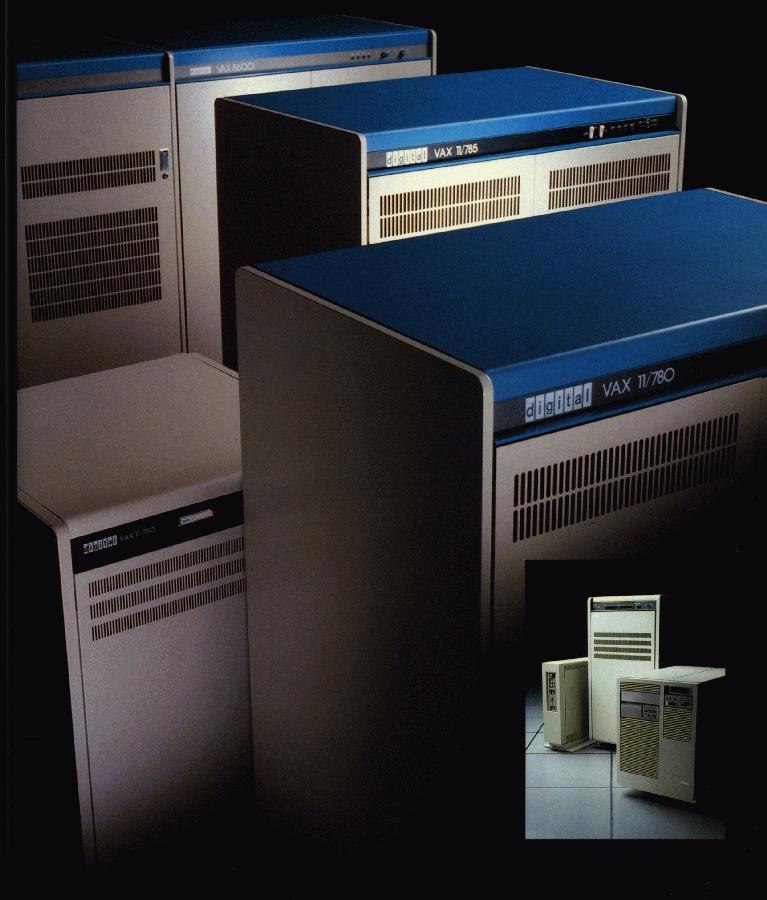
The .txt file attachd contains the compiler listing of a COBOL program I wrote for a school project that could find the optimal expression for up to 1024 Karnaugh expressions with up to 10 min-terms including “don’t cares” in a couple minutes. That was on a DEC VAX “mini-computer” about the size of a refrigerator with as I recall about 3MB of RAM and processed at 1 MIPs, or about 40 times slower than the average cell phone. Fortunately, VAX/VMS included virtual memory management – the size of the compiled image was probably close to the size of total memory on the machine. Here’s an article that explains Karnaugh expressions:

Here’s a picture of what it looked like: http://hampage.hu/vax/kepek/sokvax.jpg

The instructor did not appreciate this project and gave me a “C”. He did not believe it could work and had argued with me that computers could not perform logic, they could only do calculations, therefore no software program could perform a Karnaugh map reduction. I think the fact that I chose to do this in COBOL didn’t help either, since as many other academians he expressed disdain for the language.

And yes, the code actually worked. You can read about Karnaugh maps at wikipedia – http://en.wikipedia.org/wiki/Karnaugh_map. The code utilizes aspects from Quine McCluskey method.

Bob

Posted in Uncategorized | Leave a comment

Update on PCIE-SSD (Fusion-IO) Performance

I’ve been working on this and wanted to achieve max throughput before posting, but since I am stuck, thought I would post what I have to this point. I have 4 Fusion-IO cards including a duo in a 12 core (2.66 MHz/12 MB Cache, E5650 processors) with 96 GB of RAM. Here are the numbers I got on SQL Server backup after striping database file-groups over three different drives and the log mirrored on 2 of the drives. What is interesting is that the CPUs show as 100% for the whole process, so even though theoretically this configuration should allow over 2 GBps throughput (i.e. 3 x 750 MBps per IODrive), the processors get maxed out.

Also, it doesn’t seem to matter whether SQL Server is cold or hot, SQL Backup seems to always go back to the physical database files to read even if most of the database is in cache. I am using database compression, maybe in this case it is hurting more than helping?

Doing the testing using backup to Null device to avoid bottleneck on output media too slow, changing to writing out to a RAID-0 set of SSDs though gets about the same performance. Interestingly, performance was a little better with adding multiple NUL device references (to force parallelism to multiple devices). Its hard to tell which backup parameters are really making that much impact, since the bottleneck are the CPUs at this point.

Below is the results of a 120 GB database on the cards.

BACKUP DATABASE [tp_v5_dev] TO 
DISK = ‘NUL:’, DISK=’NUL:’,DISK=’NUL:’,DISK=’NUL:’,DISK=’NUL:’,DISK=’NUL:’
,DISK = ‘NUL:’, DISK=’NUL:’,DISK=’NUL:’,DISK=’NUL:’,DISK=’NUL:’,DISK=’NUL:’
–disk=’h:\sqlbackup\folibackuptest1.bak’,
–disk=’h:\sqlbackup\folibackuptest2.bak’,
–disk=’h:\sqlbackup\folibackuptest3.bak’,
–disk=’h:\sqlbackup\folibackuptest4.bak’,
–disk=’h:\sqlbackup\folibackuptest5.bak’,
–disk=’h:\sqlbackup\folibackuptest6.bak’

WITH NOFORMAT, NOINIT,  NAME = N’tp_v5-Full Database Backup’, SKIP, NOREWIND, NOUNLOAD, COMPRESSION, STATS = 10
— Magic:
,BUFFERCOUNT = 256
,BLOCKSIZE = 65536
–,MAXTRANSFERSIZE= 4097152 – Doesn’t seem to matter too much
GO


10 percent processed.
20 percent processed.
30 percent processed.
40 percent processed.
50 percent processed.
60 percent processed.
70 percent processed.
80 percent processed.
90 percent processed.
Processed 22472 pages for database ‘tp_v5_dev’, file ‘TradingOptimizer_v2’ on file 1.
Processed 44800 pages for database ‘tp_v5_dev’, file ‘History09’ on file 1.
Processed 16 pages for database ‘tp_v5_dev’, file ‘HistoryA09a’ on file 1.
Processed 15560 pages for database ‘tp_v5_dev’, file ‘TP_History01’ on file 1.
Processed 14520 pages for database ‘tp_v5_dev’, file ‘History02’ on file 1.
Processed 20096 pages for database ‘tp_v5_dev’, file ‘History03’ on file 1.
Processed 11464 pages for database ‘tp_v5_dev’, file ‘History04’ on file 1.
Processed 13528 pages for database ‘tp_v5_dev’, file ‘History05’ on file 1.
Processed 16296 pages for database ‘tp_v5_dev’, file ‘History06’ on file 1.
Processed 20656 pages for database ‘tp_v5_dev’, file ‘History07’ on file 1.
Processed 30056 pages for database ‘tp_v5_dev’, file ‘History08’ on file 1.
Processed 846248 pages for database ‘tp_v5_dev’, file ‘HistoryData2a’ on file 1.
Processed 134872 pages for database ‘tp_v5_dev’, file ‘LoadData02’ on file 1.
Processed 197656 pages for database ‘tp_v5_dev’, file ‘LoadData2’ on file 1.
Processed 347176 pages for database ‘tp_v5_dev’, file ‘LoadData01’ on file 1.
Processed 96448 pages for database ‘tp_v5_dev’, file ‘LoadData03’ on file 1.
Processed 2939584 pages for database ‘tp_v5_dev’, file ‘MiscData2’ on file 1.
Processed 3666864 pages for database ‘tp_v5_dev’, file ‘MiscData3’ on file 1.
Processed 28944 pages for database ‘tp_v5_dev’, file ‘History10’ on file 1.
Processed 32 pages for database ‘tp_v5_dev’, file ‘Load00’ on file 1.
Processed 8176 pages for database ‘tp_v5_dev’, file ‘Load01’ on file 1.
Processed 30760 pages for database ‘tp_v5_dev’, file ‘History09b’ on file 1.
Processed 16 pages for database ‘tp_v5_dev’, file ‘HistoryA09b’ on file 1.
Processed 33448 pages for database ‘tp_v5_dev’, file ‘History09c’ on file 1.
Processed 16 pages for database ‘tp_v5_dev’, file ‘HistoryA09c’ on file 1.
Processed 36496 pages for database ‘tp_v5_dev’, file ‘History09d’ on file 1.
Processed 16 pages for database ‘tp_v5_dev’, file ‘HistoryA09d’ on file 1.
Processed 34760 pages for database ‘tp_v5_dev’, file ‘History10a’ on file 1.
Processed 16 pages for database ‘tp_v5_dev’, file ‘HistoryA10a’ on file 1.
Processed 38576 pages for database ‘tp_v5_dev’, file ‘History10b’ on file 1.
Processed 16 pages for database ‘tp_v5_dev’, file ‘HistoryA10b’ on file 1.
Processed 51344 pages for database ‘tp_v5_dev’, file ‘History10c’ on file 1.
Processed 16 pages for database ‘tp_v5_dev’, file ‘HistoryA10c’ on file 1.
Processed 176656 pages for database ‘tp_v5_dev’, file ‘History10d’ on file 1.
Processed 16 pages for database ‘tp_v5_dev’, file ‘HistoryA10d’ on file 1.
Processed 136 pages for database ‘tp_v5_dev’, file ‘Archive01’ on file 1.
Processed 7968 pages for database ‘tp_v5_dev’, file ‘Load02’ on file 1.
Processed 9720 pages for database ‘tp_v5_dev’, file ‘Load03’ on file 1.
Processed 9168 pages for database ‘tp_v5_dev’, file ‘Load04’ on file 1.
Processed 9360 pages for database ‘tp_v5_dev’, file ‘Load05’ on file 1.
Processed 10200 pages for database ‘tp_v5_dev’, file ‘Load06’ on file 1.
Processed 9872 pages for database ‘tp_v5_dev’, file ‘Load07’ on file 1.
Processed 10552 pages for database ‘tp_v5_dev’, file ‘Load08’ on file 1.
Processed 12680 pages for database ‘tp_v5_dev’, file ‘Load09’ on file 1.
Processed 13344 pages for database ‘tp_v5_dev’, file ‘Load10’ on file 1.
Processed 11984 pages for database ‘tp_v5_dev’, file ‘Load11’ on file 1.
Processed 13360 pages for database ‘tp_v5_dev’, file ‘Load12’ on file 1.
Processed 11552 pages for database ‘tp_v5_dev’, file ‘Load13’ on file 1.
Processed 9912 pages for database ‘tp_v5_dev’, file ‘Load14’ on file 1.
Processed 12168 pages for database ‘tp_v5_dev’, file ‘Load15’ on file 1.
Processed 11648 pages for database ‘tp_v5_dev’, file ‘Load16’ on file 1.
Processed 12456 pages for database ‘tp_v5_dev’, file ‘Load17’ on file 1.
Processed 11616 pages for database ‘tp_v5_dev’, file ‘Load18’ on file 1.
Processed 26272 pages for database ‘tp_v5_dev’, file ‘Load19’ on file 1.
Processed 25376 pages for database ‘tp_v5_dev’, file ‘Load20’ on file 1.
Processed 20296 pages for database ‘tp_v5_dev’, file ‘Load21’ on file 1.
Processed 21864 pages for database ‘tp_v5_dev’, file ‘Load22’ on file 1.
Processed 20480 pages for database ‘tp_v5_dev’, file ‘Load23’ on file 1.
Processed 24032 pages for database ‘tp_v5_dev’, file ‘Load24’ on file 1.
Processed 15960 pages for database ‘tp_v5_dev’, file ‘SimIndex01’ on file 1.
Processed 15784 pages for database ‘tp_v5_dev’, file ‘SimIndex02’ on file 1.
Processed 15024 pages for database ‘tp_v5_dev’, file ‘SimIndex04’ on file 1.
Processed 14952 pages for database ‘tp_v5_dev’, file ‘SimIndex05’ on file 1.
Processed 16 pages for database ‘tp_v5_dev’, file ‘Sim42’ on file 1.
Processed 131696 pages for database ‘tp_v5_dev’, file ‘History11a’ on file 1.
Processed 130872 pages for database ‘tp_v5_dev’, file ‘Intraday01’ on file 1.
Processed 42360 pages for database ‘tp_v5_dev’, file ‘Intraday’ on file 1.
Processed 109464 pages for database ‘tp_v5_dev’, file ‘History11b’ on file 1.
Processed 96360 pages for database ‘tp_v5_dev’, file ‘History11c’ on file 1.
Processed 72 pages for database ‘tp_v5_dev’, file ‘History11d’ on file 1.
Processed 64 pages for database ‘tp_v5_dev’, file ‘History12a’ on file 1.
Processed 64 pages for database ‘tp_v5_dev’, file ‘History12b’ on file 1.
Processed 64 pages for database ‘tp_v5_dev’, file ‘History12c’ on file 1.
Processed 64 pages for database ‘tp_v5_dev’, file ‘History12d’ on file 1.
Processed 7912 pages for database ‘tp_v5_dev’, file ‘loadfg25’ on file 1.
Processed 7936 pages for database ‘tp_v5_dev’, file ‘loadfg25a’ on file 1.
Processed 7928 pages for database ‘tp_v5_dev’, file ‘loadfg25b’ on file 1.
Processed 9616 pages for database ‘tp_v5_dev’, file ‘loadfg26’ on file 1.
Processed 9624 pages for database ‘tp_v5_dev’, file ‘loadfg26a’ on file 1.
Processed 9616 pages for database ‘tp_v5_dev’, file ‘loadfg26b’ on file 1.
Processed 11680 pages for database ‘tp_v5_dev’, file ‘loadfg27’ on file 1.
Processed 11648 pages for database ‘tp_v5_dev’, file ‘loadfg27a’ on file 1.
Processed 11656 pages for database ‘tp_v5_dev’, file ‘loadfg27b’ on file 1.
Processed 9768 pages for database ‘tp_v5_dev’, file ‘loadfg28’ on file 1.
Processed 9760 pages for database ‘tp_v5_dev’, file ‘loadfg28a’ on file 1.
Processed 9800 pages for database ‘tp_v5_dev’, file ‘loadfg28b’ on file 1.
Processed 9744 pages for database ‘tp_v5_dev’, file ‘loadfg29’ on file 1.
Processed 9760 pages for database ‘tp_v5_dev’, file ‘loadfg29a’ on file 1.
Processed 9784 pages for database ‘tp_v5_dev’, file ‘loadfg29b’ on file 1.
Processed 10592 pages for database ‘tp_v5_dev’, file ‘loadfg30’ on file 1.
Processed 10624 pages for database ‘tp_v5_dev’, file ‘loadfg30a’ on file 1.
Processed 10616 pages for database ‘tp_v5_dev’, file ‘loadfg30b’ on file 1.
Processed 9368 pages for database ‘tp_v5_dev’, file ‘loadfg31’ on file 1.
Processed 9376 pages for database ‘tp_v5_dev’, file ‘loadfg31a’ on file 1.
Processed 9384 pages for database ‘tp_v5_dev’, file ‘loadfg31b’ on file 1.
Processed 11768 pages for database ‘tp_v5_dev’, file ‘loadfg32’ on file 1.
Processed 11760 pages for database ‘tp_v5_dev’, file ‘loadfg32a’ on file 1.
Processed 11760 pages for database ‘tp_v5_dev’, file ‘loadfg32b’ on file 1.
Processed 9904 pages for database ‘tp_v5_dev’, file ‘loadfg33’ on file 1.
Processed 9912 pages for database ‘tp_v5_dev’, file ‘loadfg33a’ on file 1.
Processed 9912 pages for database ‘tp_v5_dev’, file ‘loadfg33b’ on file 1.
Processed 152 pages for database ‘tp_v5_dev’, file ‘loadfg34’ on file 1.
Processed 152 pages for database ‘tp_v5_dev’, file ‘loadfg34a’ on file 1.
Processed 152 pages for database ‘tp_v5_dev’, file ‘loadfg34b’ on file 1.
Processed 152 pages for database ‘tp_v5_dev’, file ‘loadfg35’ on file 1.
Processed 152 pages for database ‘tp_v5_dev’, file ‘loadfg35a’ on file 1.
Processed 152 pages for database ‘tp_v5_dev’, file ‘loadfg35b’ on file 1.
Processed 152 pages for database ‘tp_v5_dev’, file ‘loadfg36’ on file 1.
Processed 152 pages for database ‘tp_v5_dev’, file ‘loadfg36a’ on file 1.
Processed 152 pages for database ‘tp_v5_dev’, file ‘loadfg36b’ on file 1.
100 percent processed.
Processed 0 pages for database ‘tp_v5_dev’, file ‘TradingOptimizer_v2_log’ on file 1.
Processed 2 pages for database ‘tp_v5_dev’, file ‘TradingOptimizer_log3’ on file 1.
Processed 0 pages for database ‘tp_v5_dev’, file ‘TradingOptimizerlog4’ on file 1.
BACKUP DATABASE successfully processed 10049026 pages in 57.071 seconds (1375.620 MB/sec).

Posted in Uncategorized | Leave a comment

SSD Updates and Status of Blog

I’m sorry it’s been so long since I’ve posted.  Been very busy with a DoD project.  I plan to add a post soon on how my SSD experience is going.  I have now accumulated 7 PCIE Fusion SSD cards (3 SLC 160GB, 3 320GB MLC, 1 320 Duo SLC) as well as an additional server which has 3 cards in it.  Right now, my duo card is running in an older workstation as I had problem trying to get power to the card in the 2U R700 Dell server.  A weird cable that can’t be ordered direct on the Dell site is needed.  My 2U is 12 cores with 96GB of RAM with 12 physical cores (2 x XEON 2.66).  I’m going to be very heavily stressing it with some heavy duty analytical queries against several multi-million row tables and a billion row table containing financial data over the next few days and will share the results.

Speaking of the blog, I will try to post once per month, but will be more active on a new blog focused on my research (non-Microsoft)..  This will be for my academic research as well as the application of that research to financial markets in the area of autonomous learning through iterative simulation with correlation feedback and pattern recognition.  I’ve become quite inspired in studying how young children are able to learn solutions to puzzles simply by playing and finding a pattern and being able to adapt such learned patterns to new problems with the extra caveat of examining the process used to apply the pattern.  This is something that software needs to do.  The problem with artificial intelligence is just that, it is artificial.  To solve really complex problems cannot always be done by brute force and number-crunching, it takes an intelligent design from the start.   Well, I’ve got to board an airplane, so this is a teaser for my area of passion as I head back to Auburn to try to finish my first draft of my dissertation.

Posted in Uncategorized | Leave a comment